
Choosing Headphones for Music Travel and Work
A guide to choosing headphones that feel comfortable and suit your needs, covering sound, fit, noise control, microphone quality, connectivity, battery life, durability, and everyday use.
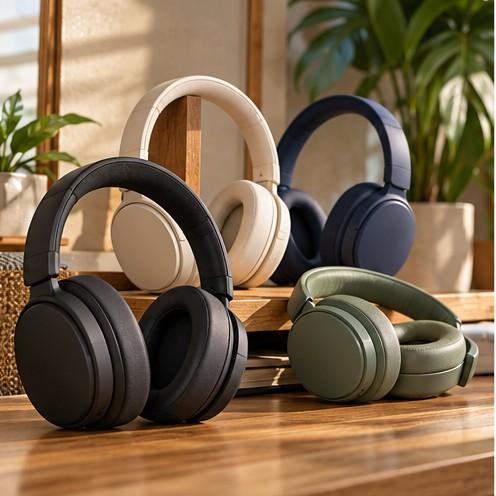
Image disclosure: All images, people, products, interfaces, places, and scenes in this article are AI-generated for illustration purposes only. They are original, fictional or generic concepts and do not represent actual individuals, commercial products, retailers, software interfaces, test results, medical results, camera samples, or real-world events.
Introduction
A guide to choosing comfortable headphones by sound, fit, noise control, microphone quality, connectivity, battery life, durability, and everyday use. The goal is to match the purchase to real routines and limitations rather than choose from one headline specification.
This is an independently edited, criteria-based guide. It is not a hands-on test or ranked product roundup. Specifications, regional configurations, compatibility, prices, availability, warranties, and software support can change, so verify the exact Philippine model and seller information before buying.
At a Glance Buying Factors
Factor | Why it matters | What to verify |
Fit and comfort | Weight, clamping pressure, heat, and ear-cup space can affect comfort during long listening sessions. | If possible, try the headphones during a typical listening session. If you wear glasses, check whether the ear cups press uncomfortably against the arms |
Sound | Tuning and detail preferences vary by music and use. | Listen to a few songs you know, if you can. If you can’t try the headphones, published sound measurements may offer a useful point of comparison, though they can’t tell you what you’ll personally enjoy.
|
Noise control | Isolation and active cancellation handle different sounds differently. | If possible, try the headphones around the kinds of sounds you want to block out. Otherwise, look for reviews that test everyday noise, such as traffic, nearby conversations, and wind. . |
Battery life | Wireless headphones need charging, and battery life may be shorter when features like noise cancellation are on. | Check the stated listening time with noise cancellation on, if available. For wireless earbuds, also check the charging case’s total charge capacity. |
Calls | Microphone clarity depends on room noise, wind, and connection mode. | Review recordings in conditions similar to your work. |
Connectivity | Bluetooth features, wired use, multipoint, and latency vary. | Check compatibility with your devices, apps, operating system, and any cable or adapter you may need.
|
Decide Where You Will Use Them Most
A quiet room, busy office, airplane, jeepney ride, and outdoor walk create different priorities. Music listeners may focus on sound and comfort, travelers on noise reduction and folding design, and remote workers on microphone clarity and multipoint switching. Rank your two most common situations before comparing features, because one headphone rarely leads in every area.
Put Comfort Before Extra Features
Headphones that sound excellent are not useful if they cause pressure or heat after thirty minutes. Consider weight, clamping force, headband padding, ear-cup depth, material, adjustability, and how they fit with glasses. Larger ears may touch shallow pads. Replaceable cushions can extend useful life, but check price and local availability.

Understand Sound Without Chasing One Perfect Tuning
Some headphones make bass stand out, while others bring voices or high notes forward. There’s no one sound that works for everyone, so think about what you enjoy listening to. Frequency-response charts can give you a useful starting point, and familiar songs can help you judge the sound for yourself. An equalizer can adjust the balance, but it can’t fix every problem—such as distortion, a poor fit, or a loose seal around your ears.
Compare Active Cancellation and Passive Isolation
Passive isolation comes from the physical seal and is often effective against nearby voices and higher-frequency sounds. Active noise cancellation is particularly useful for steady low-frequency noise such as engines and air-conditioning, but performance varies. It does not make surroundings silent. Keep situational awareness near roads, platforms, and other hazards.

Check Microphones in Real Conditions
A call microphone may sound clear in a quiet room yet struggle with fans, traffic, wind, or several nearby voices. Look for recordings made in environments similar to yours. Bluetooth call quality also depends on the connected device and software. If meetings are critical, a dedicated boom microphone or wired headset may be more reliable than lifestyle headphones.
Review Bluetooth Wired Use and Switching
Check supported Bluetooth version, multipoint behavior, pairing stability, latency, and whether all functions work with your phone and laptop. Some wireless headphones support audio through a cable when the battery is empty, while others need power for processing. Confirm whether the USB cable carries audio or only charges.
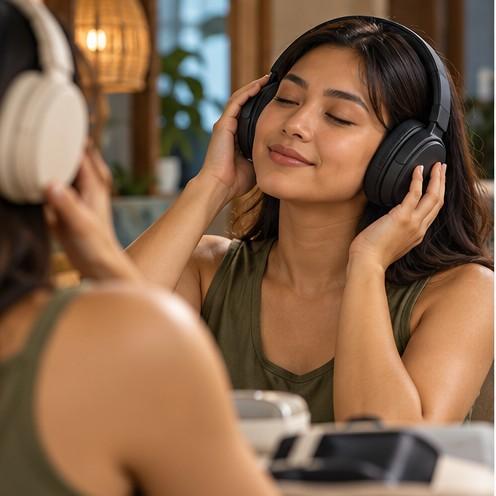
AI-generated semi-realistic illustration of comfort fit and long listening sessions. It is illustrative and is not evidence of product testing or measured performance.
Treat Battery Claims as Test Conditions
Battery life changes with volume, active noise cancellation, codec, calls, temperature, and battery age. Compare reviews using similar settings. Fast charging can help travelers, but verify the required cable and adapter. Store and charge headphones away from excessive heat, and stop using batteries that swell, leak, or become unusually hot.
Consider Durability Repair and Total Cost
Hinges, sliders, pads, cables, and batteries are common wear points. Check replacement parts, case quality, water-resistance claims, warranty, and authorized service. Add the cost of adapters or a microphone if needed. A simpler model with replaceable pads and a reliable cable can outlast a feature-rich design with unavailable parts.
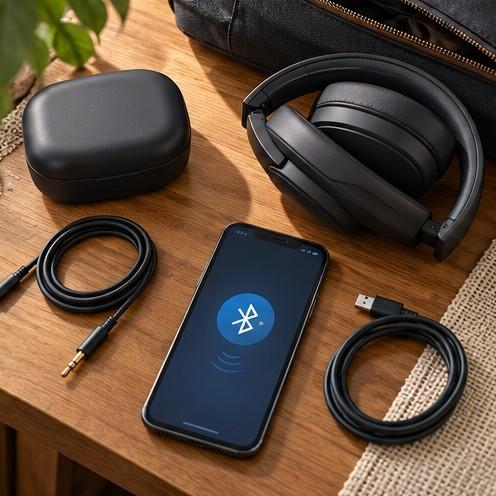
AI-generated semi-realistic illustration of wired wireless and charging options. It is illustrative and is not evidence of product testing or measured performance.
Common Mistakes to Avoid
Choosing headphones based on one advertised feature, such as bass or noise cancellation, without considering comfort and sound for everyday use.
Assuming similar model names mean the headphones have the same features, accessories, or warranty.
Relying on product photos or one short review instead of checking several trustworthy sources.
Overlooking compatibility with your phone, computer, or the apps and connections you use.
Forgetting ongoing costs, such as replacement ear cushions, cables, or a paid app subscription.
Buying from an uncertain seller without checking the return policy, receipt, local warranty, and repair options.
Questions to Ask Before Buying
Where will I use these headphones most: at home, at work, while commuting, or during exercise?
What matters most to me: comfort, sound, noise cancellation, call quality, or battery life?
Do they fit comfortably enough for the amount of time I plan to wear them?
Will they work well with my phone, computer, and the apps I use?
What do reliable reviews say about their performance during everyday use?
What does the warranty cover, and can I get repairs or replacement ear cushions locally?
XploreSulit Summary
Choose headphones that suit how you’ll use them and feel comfortable enough to wear. Give priority to the features you’ll notice most, such as sound, noise cancellation, call quality, or battery life. Check the exact model and total cost, and use reliable reviews to see how it performs in everyday use.
Frequently Asked Questions
Not necessarily. Comfort depends on the fit, weight, clamping pressure, ear-pad depth, and how warm the headphones feel. What works well for one person may not suit another.
Active noise cancellation reduces some outside sounds, but it doesn’t block everything. Use transparency mode or take the headphones off when you need to stay aware of your surroundings.
No. A higher price may reflect extra features, materials, or design, but sound quality is personal. Fit and the kind of sound you enjoy matter too.
Wireless headphones are convenient, while wired ones don’t need charging and can be a good choice when low audio delay matters. Check that the wired connection works with your device; you may need an adapter. Some models support both wired and wireless use.
Related Buying Guides
How to Choose the Right Wireless Earbuds
A reader-friendly guide to comparing wireless earbuds by sound, fit, call quality, battery life, noise control, connectivity, and after-sales support