
Choosing a Smartphone for Mobile Gaming
Guide in choosing gaming-capable smartphone by sustained performance, display response, controls, battery, charging, storage, connectivity, software support, and overall value.

Image disclosure: All images in this article are AI-generated illustrations. Any people, products, interfaces, places, or scenes shown are fictional or generic and do not depict real individuals, specific commercial products or retailers, actual software interfaces, test or medical results, camera samples, or real-world events.
Introduction
A buying guide to choosing a gaming-capable smartphone by sustained performance, display response, controls, battery, charging, storage, connectivity, software support, and overall value. The goal is to match the purchase to real routines and limitations rather than choose from one headline specification.
This is an independently edited, criteria-based guide. It is not a hands-on test or ranked product roundup. Specifications, regional configurations, compatibility, prices, availability, warranties, and software support can change, so verify the exact Philippine model and seller information before buying.
Buying Factors
Factor | Why it matters | What to verify |
|---|---|---|
Sustained performance | Games need stable performance over time, not only a strong first benchmark. | Review longer gaming tests for the exact model and graphics settings. |
Display and touch | Refresh rate, touch response, brightness, and resolution affect control and visibility. | Confirm which games support the advertised refresh rate and frame rate. |
Heat and comfort | Heat can reduce performance and make a phone uncomfortable to hold. | Check sustained tests, case use, charging behavior, and landscape grip. |
Battery and charging | Gaming drains power quickly, while charging during play can add heat. | Compare realistic gaming endurance and compatible charger requirements. |
Storage and network | Large game files, updates, Wi-Fi, and mobile data shape daily use. | Allow room beyond the listed game size and verify Philippine network support. |
Begin With the Games You Actually Play
List the titles you play now and the ones you expect to try. Casual puzzle and card games place different demands on a phone than large open-world, racing, competitive shooter, or emulation workloads. Check each game’s official Android or iOS requirements and whether high-frame-rate modes are enabled for the exact device. A powerful specification does not guarantee that every developer has optimized a game for it.
Judge Performance Over a Full Session
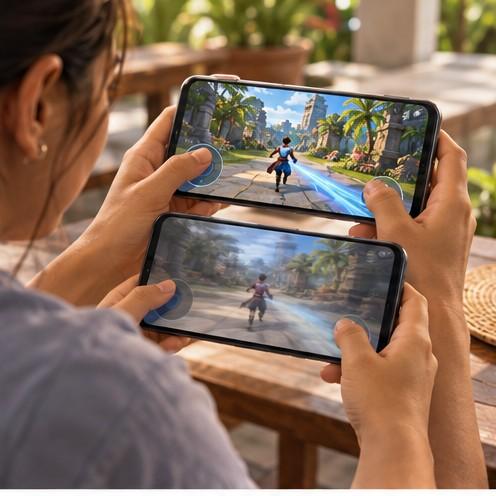
Short benchmark runs can show peak speed, but gaming sessions reveal whether performance remains stable as the phone warms. Look for credible reviews that record frame-rate consistency, power consumption, surface temperature, and throttling over at least several repeated matches or a longer play period. Compare results at settings you would realistically use rather than assuming the highest preset is always the best experience.
Examine the Display and Touch Controls
A high refresh rate can make supported games look smoother, while responsive touch input can help with quick controls. Also consider brightness, reflections, resolution, color, accidental touches, and whether the screen dims under heat. Some games remain capped at lower frame rates even on a fast panel. Confirm actual game support instead of treating 120 Hz or 144 Hz as an automatic gaming result.
Consider Heat Grip and Speaker Placement

A phone can feel awkward in landscape orientation if camera bumps, buttons, charging cables, or speakers sit under your hands. Read reports about warm areas and comfort during longer sessions. Clip-on coolers may help in some conditions, but they add cost, noise, weight, and power requirements. Avoid moisture-producing or improvised cooling methods that could damage the device.
Size the Battery and Charging System Together
Battery capacity alone does not reveal gaming endurance. Processor efficiency, brightness, signal strength, frame rate, graphics settings, and background apps all matter. Check charging speed, supported standards, the included adapter, and heat during charging. Playing demanding games while fast charging can raise temperature, so follow the manufacturer’s guidance and use reputable, correctly rated chargers and cables.
Plan for Games Updates and Recordings
Modern games can require large initial downloads plus additional resources, patches, cached files, screenshots, and recordings. A 128 GB phone may be enough for lighter use, while several large titles can make 256 GB or more practical. Check usable storage after system files and whether a memory card can actually hold game data; many games must stay in internal storage.
Check Wi Fi Mobile Data and Accessories
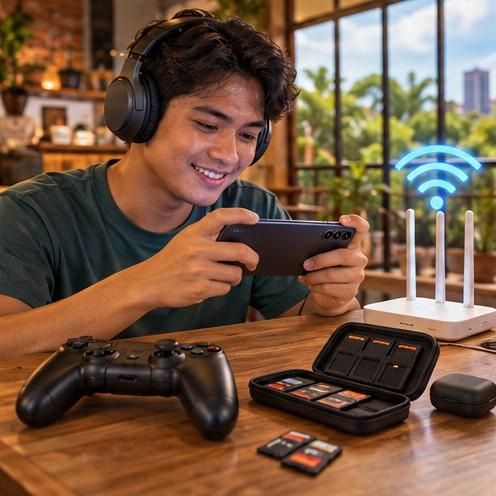
Stable latency often matters more than headline download speed. Consider your home router, mobile coverage, congestion, server location, and whether the exact regional phone supports the Philippine bands you need. If you use a controller, headset, monitor, or USB-C hub, verify compatibility, audio delay, video output, charging pass-through, and game support before buying accessories.
Do Not Ignore Cameras Updates and Warranty
A gaming-focused phone is still your everyday device. Check cameras, calls, banking-app compatibility, water-resistance claims, update policy, security support, repair availability, and official Philippine warranty. A slightly slower but well-supported phone may be the better long-term purchase when it also provides dependable battery life, good cameras, and accessible service.
Common Mistakes to Avoid
Choosing mainly from one advertised number or feature without checking the complete everyday experience.
Assuming products with similar names have identical specifications, accessories, software, or warranty coverage.
Relying only on manufacturer images, short demonstrations, or one review instead of several credible sources.
Ignoring compatibility with existing devices, applications, connections, and Philippine services.
Forgetting accessories, subscriptions, consumables, repairs, replacement parts, and other ownership costs.
Buying from an uncertain seller without checking returns, receipts, local warranty, and authorized service.
Questions to Ask Before Buying
Which tasks or situations must this product handle every week?
Which specifications materially affect those tasks, and which features are optional?
Does the exact regional model work with my existing devices, software, network, and accessories?
What do independent reviews show during realistic, longer use?
Who provides the warranty, and where will service or replacement parts come from?
What is the total cost after necessary accessories, subscriptions, storage, consumables, or upgrades?
XploreSulit Summary
Choose the option that performs the important everyday tasks consistently, fits the way it will be used, and remains supportable within the full budget. Extra specifications are worthwhile only when they solve a real limitation. Compare exact configurations and ownership costs before deciding, and avoid treating a marketing label as a substitute for independent evidence.
Frequently Asked Questions
No. The game, processor, cooling, software settings, and developer support determine the frame rate. The screen can only display the frames the phone and game produce.
For several large games, 256 GB can provide useful breathing room. Lighter players may manage with 128 GB, while frequent recording or a large library may justify more.
Not necessarily. Many mainstream phones run games well and may offer better cameras, updates, or service. Dedicated gaming features are worthwhile only when they improve the games and controls you use.
Use the manufacturer-approved charging method and keep ventilation clear. Demanding play while fast charging can create more heat, so stop if the phone or accessory behaves abnormally.
Related Buying Guides
Finding a Good Camera Phone Without Overspending
A value-focused guide to choosing a camera phone by image quality, focus, stabilization, low-light performance, video, storage, software support, and the photos you actually take.
How Much Smartphone Storage Do You Really Need
A reader-friendly guide to choosing smartphone storage for apps, photos, videos, games, downloads, work files, and everyday use without paying for capacity you are unlikely to use.

Choosing the Right Smartphone for Your Everyday Needs
A helpful overview of what to consider when choosing a smartphone for streaming teleseryes and news, enjoying AI-generated shows, gaming, music, communication, photography, work and everyday online activities.